Your Books Are Always Current. Your Invoices Always Go Out on Time.
AI-powered expense tracking, timesheet validation, and cost-plus invoicing, from supplier bill to accounting entry, with zero manual data entry.
Book a DemoThe Real Cost of Manual Bookkeeping
Your books are a week behind. Client invoices go out late, sometimes weeks late. Budget overruns get discovered at month-end when it’s too late to act. Your bookkeeper spends days reconciling bad data from receipts, timesheets, and supplier invoices that were keyed in wrong. This isn’t a bookkeeping problem. It’s a cash flow problem. Late invoices mean late payments. Bad data means bad decisions. And the longer you wait to fix it, the more money walks out the door.
From Supplier Invoice to Clean Books in 6 Steps
Every step is automated. Your team just reviews and approves.
Invoices Arrive Automatically
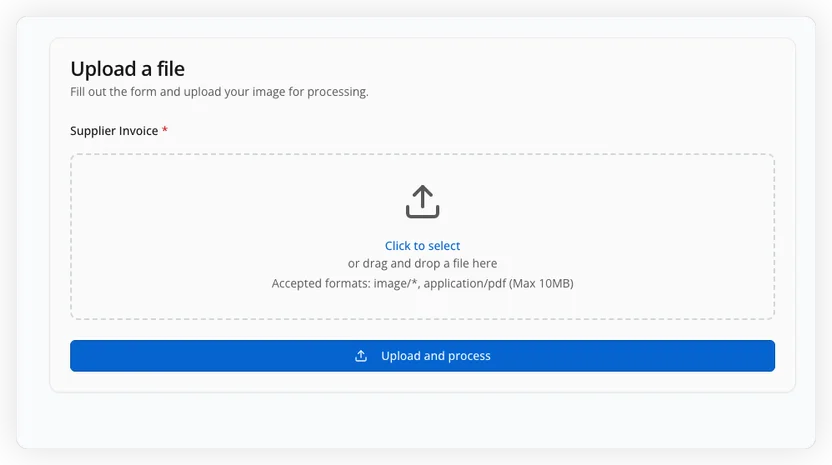
Drag and drop supplier invoices, or forward them to your dedicated email address. The system reads attachments and email body, extracting PO numbers, amounts, and vendor details automatically.
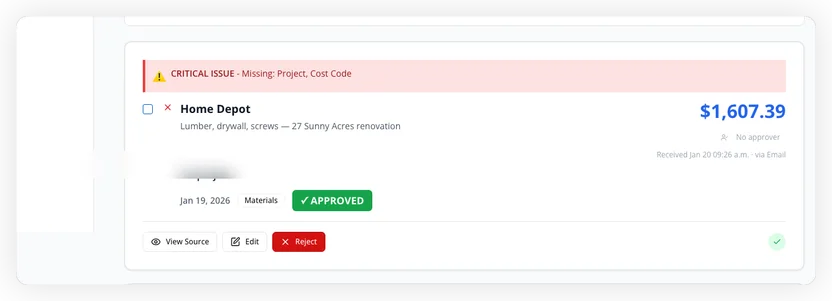
Data Extracted, POs Matched, Anomalies Flagged
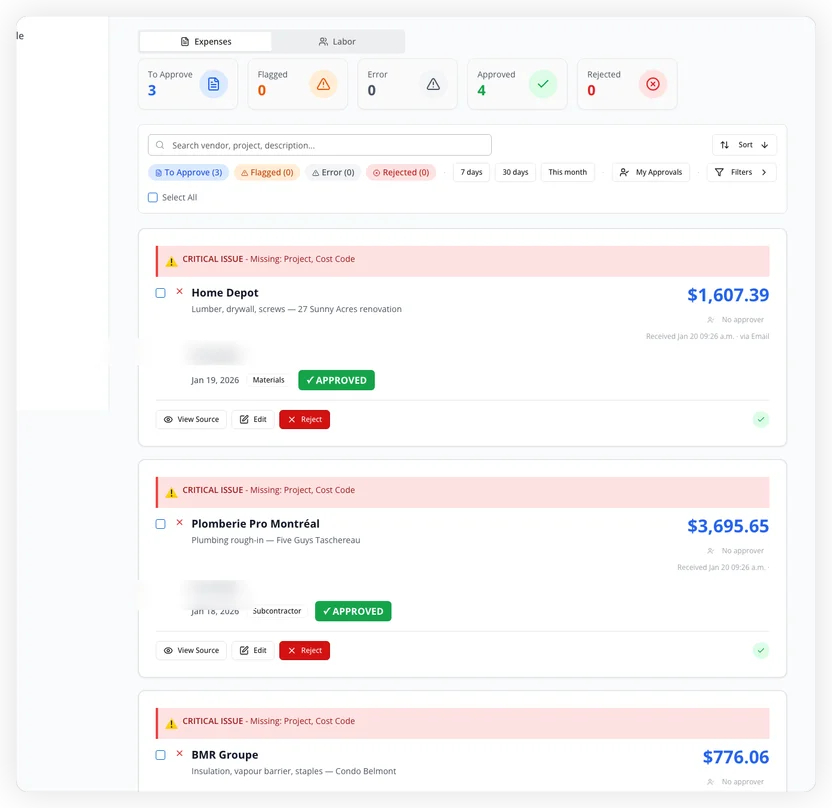
AI reads every line item, matches purchase orders, assigns cost codes, and flags anything unusual, duplicate charges, missing POs, amounts that don’t match the contract. Critical issues are surfaced immediately.
PM Approves in One Click
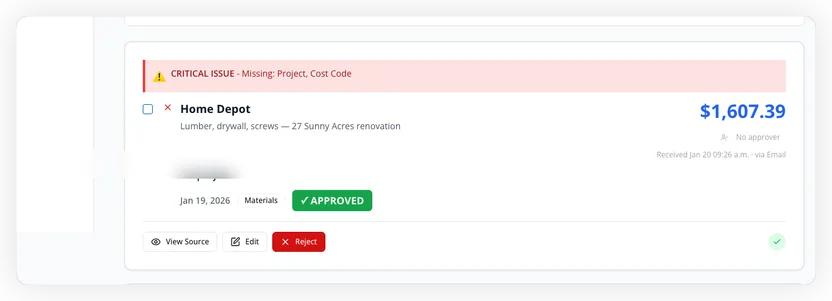
Your project manager reviews flagged expenses, edits details if needed, and approves or rejects, all from a single dashboard. No spreadsheets, no email chains, no paper shuffling.
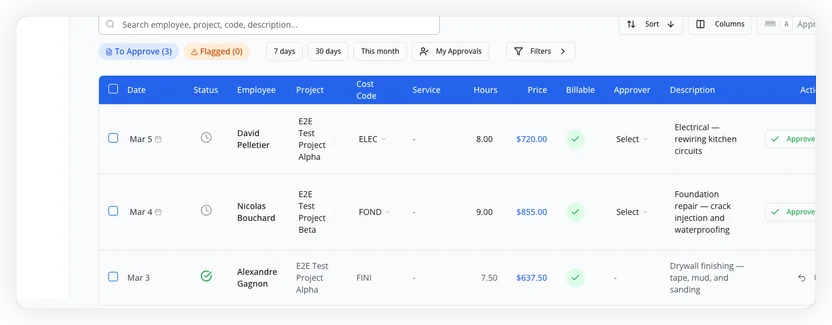
Timesheets Pulled and Validated
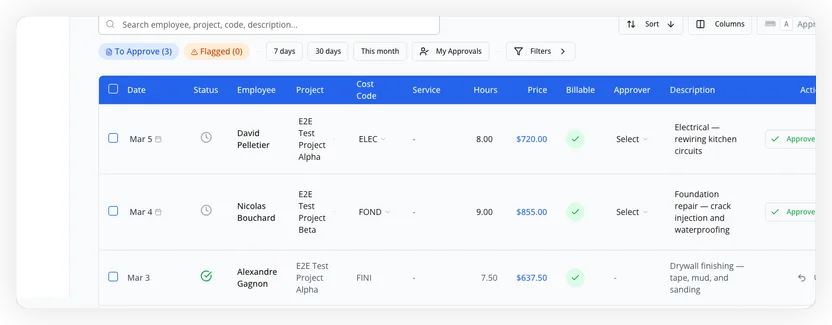
Employee hours are pulled in with cost codes, billing rates, and project assignments. The system flags overtime anomalies and missing approvals before they become billing errors.
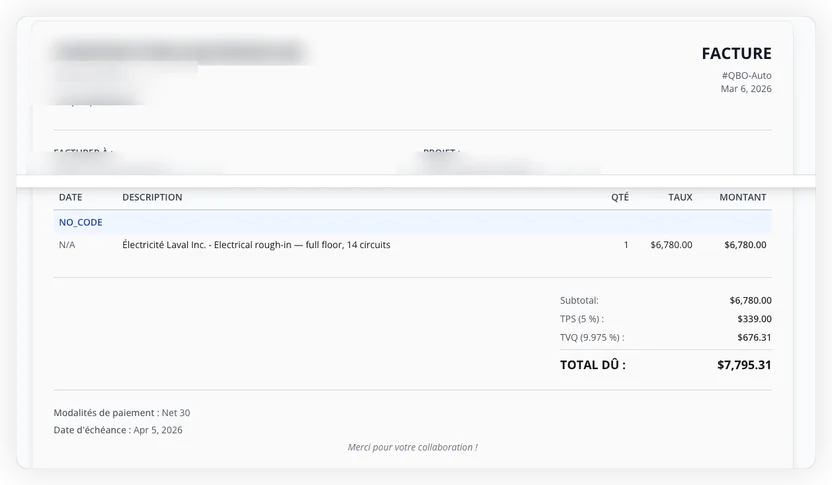
Cost-Plus Invoices Generated in 2 Clicks
Select the approved costs, set your markup percentages, and preview the client invoice, complete with line items, taxes (TPS/TVQ), and payment terms. What used to take hours now takes minutes.
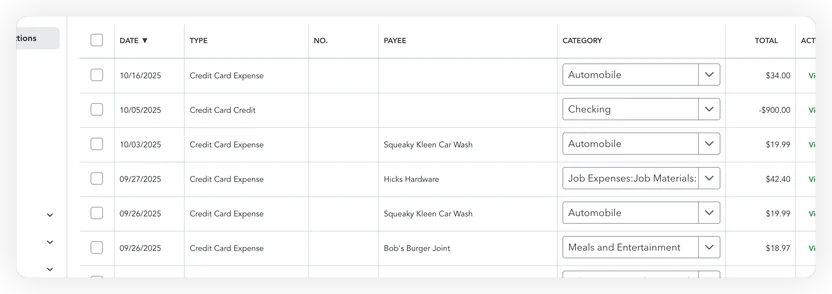
Your Bookkeeping Does Itself
Approved expenses, generated invoices, and journal entries land in your accounting software automatically. No re-keying, no copy-paste errors. Your books are current the moment work gets approved.
Invoices Arrive Automatically
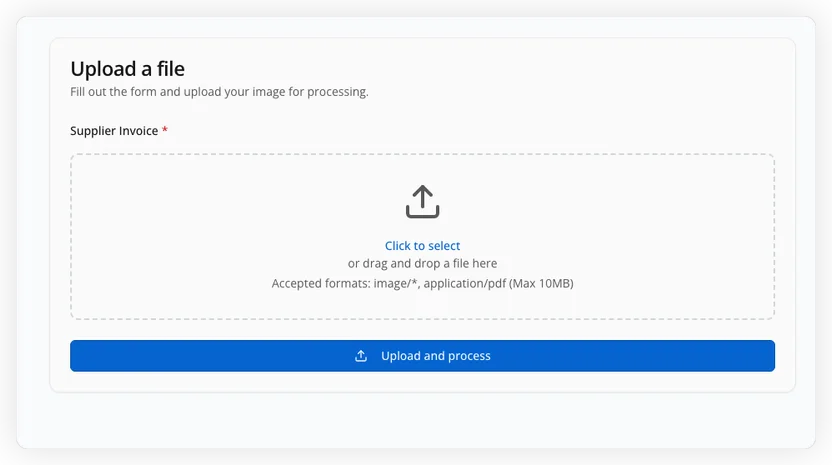
Drag and drop supplier invoices, or forward them to your dedicated email address. The system reads attachments and email body, extracting PO numbers, amounts, and vendor details automatically.
Data Extracted, POs Matched, Anomalies Flagged
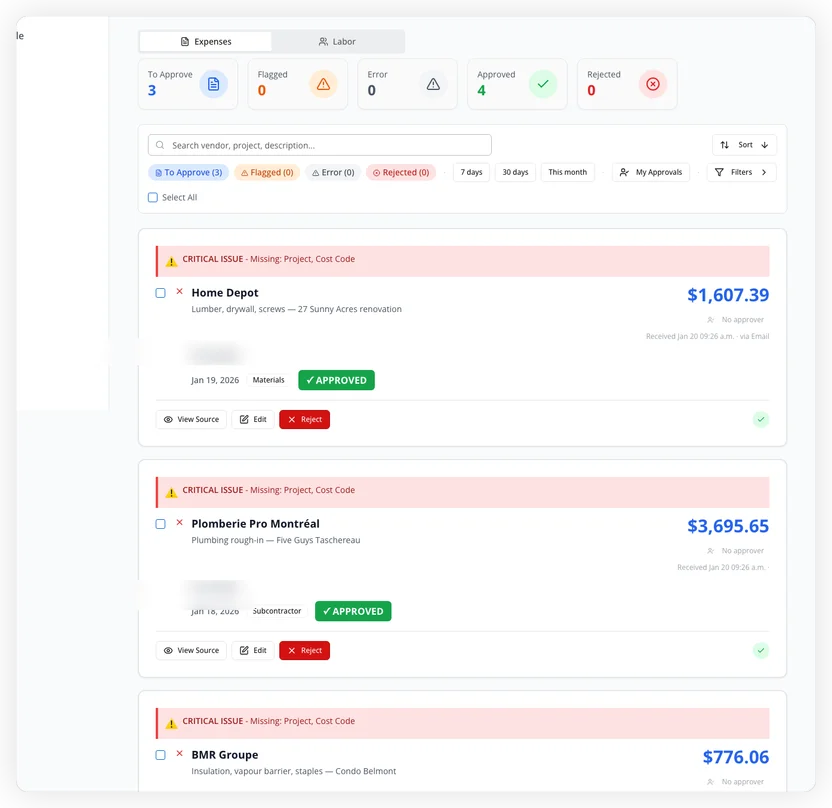
AI reads every line item, matches purchase orders, assigns cost codes, and flags anything unusual, duplicate charges, missing POs, amounts that don’t match the contract. Critical issues are surfaced immediately.
PM Approves in One Click
Your project manager reviews flagged expenses, edits details if needed, and approves or rejects, all from a single dashboard. No spreadsheets, no email chains, no paper shuffling.
Timesheets Pulled and Validated
Employee hours are pulled in with cost codes, billing rates, and project assignments. The system flags overtime anomalies and missing approvals before they become billing errors.
Cost-Plus Invoices Generated in 2 Clicks
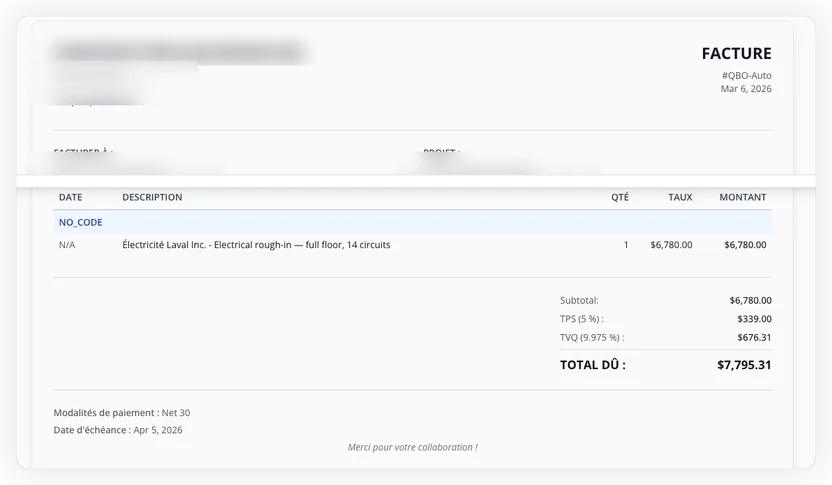
Select the approved costs, set your markup percentages, and preview the client invoice, complete with line items, taxes (TPS/TVQ), and payment terms. What used to take hours now takes minutes.
Your Bookkeeping Does Itself
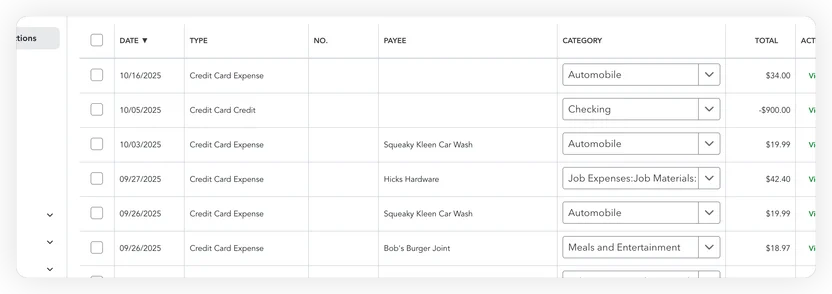
Approved expenses, generated invoices, and journal entries land in your accounting software automatically. No re-keying, no copy-paste errors. Your books are current the moment work gets approved.
Works With Your Existing Tools
Connects to the accounting and time-tracking tools you already use.
 QuickBooks
 Xero
Xero FreshBooks
 Harvest
 Toggl Track
See It Working With Your Data
Book a 20-minute demo. We’ll show you exactly how your invoices, timesheets, and expenses flow through the system, using your real documents.
What Changes for Your Team
Every role benefits. Here’s what each person stops doing manually.
PM Saves 10+ Hours/Week
Approve expenses and timesheets in one click instead of chasing paper receipts and spreadsheets across job sites.
Bookkeeper Off Manual Entry
Expenses, invoices, and journal entries land in your accounting software automatically. No more re-keying supplier invoices or correcting typos.
Controller Reviews Clean Data
Month-end reconciliation becomes a review, not a rebuild. Every dollar is already tracked to the right project and cost code.
Client Invoices Out on Time
Cost-plus invoices generated in 2 clicks with accurate markup, taxes, and line items. Faster invoicing means faster payment.
Real-Time Financial Visibility
Every expense, timesheet entry, and invoice is tracked to the project and cost code, the moment it’s approved, not at month-end.
Zero Manual Data Entry Errors
AI reads the documents. Humans review the results. No more transposed numbers, wrong GL codes, or missing receipts.
Created by People Who Ran Businesses Like Yours
24 years running businesses. We built this because we lived the problem. Thierry managed up to 40 employees as a general contractor. Anthony spent 12 years selling enterprise solutions. Between them, 24 years understanding where businesses lose time and money. They created TNT Logics because the tools they needed didn’t exist.
Questions We Hear Every Time
How long does setup take?
What if the system makes a mistake?
Will this work with the tools we already use?
How is pricing structured?
What does my crew actually have to do?
Related Agents
Materials List Digitizer
AI reads handwritten materials lists and turns them into scored purchase orders ready to send to suppliers.
Material Waste Reduction Agent
Analyzes historical material usage data across similar projects to optimize ordering quantities and reduce waste. Flags when current orders exceed historical averages by more than 15%.
Subcontractor Scheduling Optimizer
Coordinates subcontractor schedules across multiple projects, preventing conflicts and optimizing resource allocation. Flags potential delays 48 hours in advance.
Equipment Maintenance Predictor
Tracks equipment usage hours, maintenance history, and performance metrics to predict optimal maintenance windows. Reduces unexpected failures by 60%.
Invoice Payment Accelerator
Generates progress invoices based on completed milestones, sends payment reminders, and tracks payment status. Reduces average collection time from 45 to 28 days.
Safety Compliance Monitor
Tracks safety incidents, generates OSHA-compliant reports, and monitors training expiration dates. Reduces compliance violations by 80%.
Stop Chasing Paper. Start Getting Paid Faster.
Join construction companies that invoice clients the same week the work gets done, not three weeks later.